$ ₹ Buy X pcs of an assortment A and Get benefit on Y pcs of same assortment
| 🧭 Navigation
Go to:
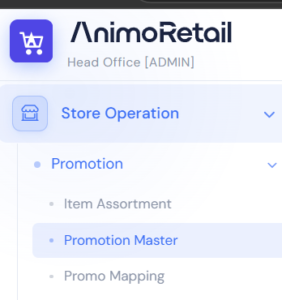
Store Operation → Promotion Master
Prerequisite –
- Crete assortments for Buy Item
- Assortment is list of items on which this discount to be applicable
Example
Buy 1 T-Shirt and Get Other One Free
Buy 2 pcs of T-Shirt and get 3 pcs of t-shirt free |
|
|
💸Promotion Master
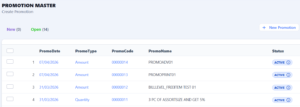
- List of existing promotions appears here
- Click on New Promotion Button
|
|
|
Step 1: Fill Information
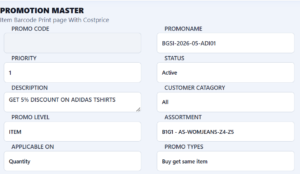
- Promo Name – This could be small code of your promotion which is saved in POS Bills to analyze promotion sale.
- Priority – Suppose there are two promotions on a brand, system executes promotion with higher priority first , if not eligible then executes other one
- Customer Category – Choose category if the promotion is only for specific type of customer such as employees or business customers only.
- Promo Level – ITEM
- Applicable On – QUANTITY
- Promo Type – BUY GET SAME ITEM
|
|
|
Step 2: Choose Assortment
- To create / manage assortment there is another article, please follow that
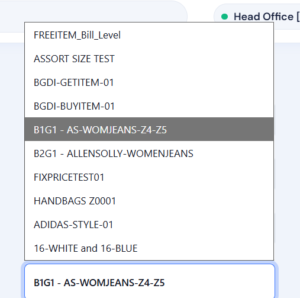
- Select the Assortment on which this discount is to be applicable
|
|
|
Step 3 : Decide Benefit
- Benefit Type –
Discount% or Fix Price or Amount
- Benefit Value –
- How much discount to be given in case benefit type is discount % or amount
- From and To Quantity – As per requirement
- In Next Step an example illustrate complete Logic
|
|
|
| From Quantity |
To Quantity |
Benefit Type |
Benefit Value |
Benefit On |
Logic |
Remarks |
| 2 |
2 |
Discount % |
100 |
1 |
Buy 1 Get 1 |
|
| 5 |
5 |
Discount % |
100 |
3 |
Buy 2 Get 3 |
|
| 2 |
2 |
Fix Price |
99 |
1 |
Buy 1 and Get Second Item on Fix Price @99 |
|
|
|
⚠️ Important Notes
- Priority is very important , for one item only one promotion can be applied that depends on priority
|
|
|
|